Website owners often assume hackers only target high-traffic websites, ecommerce stores, or organizations with valuable customer data. The reality is very different.
A recent incident involving a WordPress website hosted on IONOS demonstrated how automated attacks can compromise even a small business website—and why every WordPress installation deserves a proper security strategy.
It Started With a Simple Critical Error

The website suddenly displayed the familiar WordPress message:
“There has been a critical error on this website.”
At first glance, it looked like an ordinary plugin conflict or a failed update.
The debugging process began by enabling WordPress debug logging, which immediately revealed an unusual fatal error:
Cannot redeclare function get_page()
The error pointed toward a file that should never exist inside a standard WordPress installation:
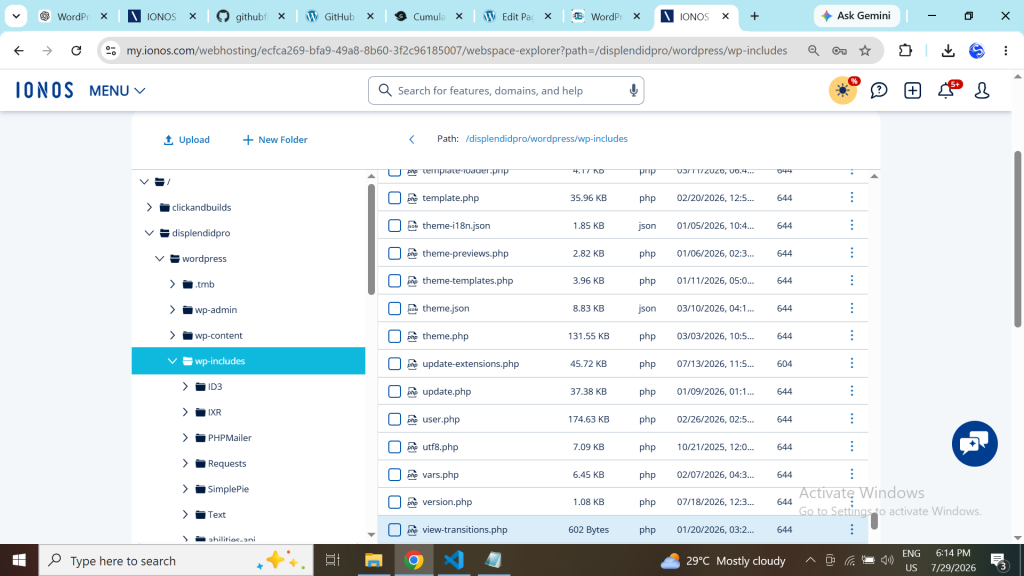
wp-includes/update-extensions.php
That was the first indication that the issue wasn’t an ordinary WordPress bug.
Discovering the Backdoor
Opening the file immediately changed the direction of the investigation.
Instead of WordPress core code, the file contained a sophisticated PHP backdoor capable of:
- Uploading and downloading files
- Editing files directly on the server
- Browsing the entire hosting account
- Reading
wp-config.php - Extracting database credentials
- Searching for additional WordPress installations
- Creating additional malicious PHP files
This wasn’t simply malware—it was effectively a remote administration toolkit for an attacker.
A Second Hidden Backdoor
The investigation continued.
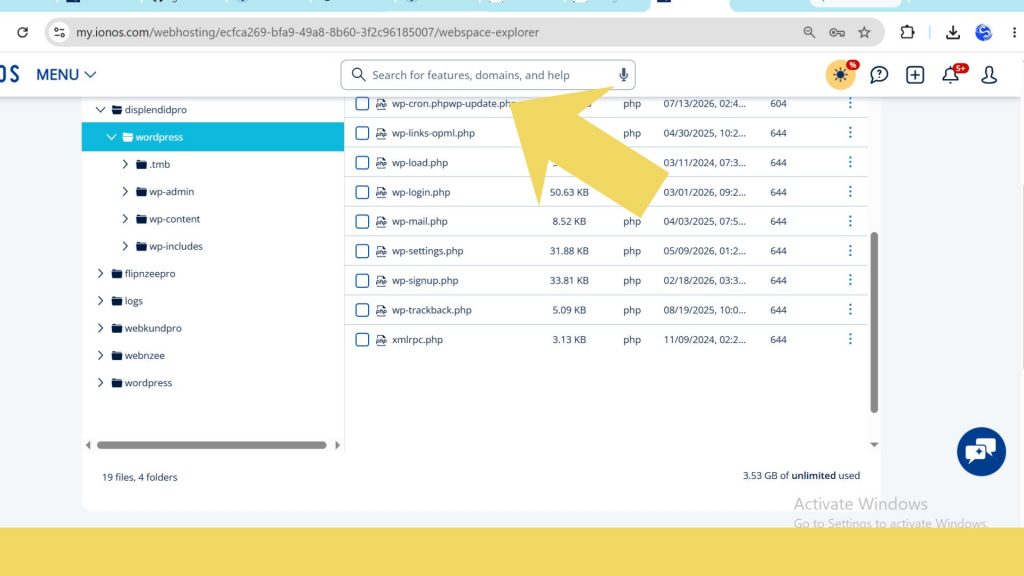
Another suspicious file appeared in the WordPress root:
wp-cron.phpwp-update.php
Again, this filename does not belong to WordPress.
Its contents confirmed it was another backdoor related to the same infection.
At this point it became clear that the website had not merely experienced a software bug—it had been compromised.
Restoring WordPress Core
Rather than attempting to edit infected files individually, the recovery followed a safer approach.
The following actions were performed:
- Deleted the malicious
update-extensions.php - Deleted the malicious
wp-cron.phpwp-update.php - Replaced the entire
wp-admindirectory - Replaced the entire
wp-includesdirectory
The replacement was performed using clean WordPress 7.0.2 files uploaded through SFTP using FileZilla.
Importantly:
wp-contentremained untouched- Themes remained intact
- Plugins remained installed
- Uploads remained untouched
- The database remained untouched
Within minutes the website was operational again.
Wordfence Revealed One More Surprise
After restoring WordPress, Wordfence Security was installed and a full malware scan was performed.
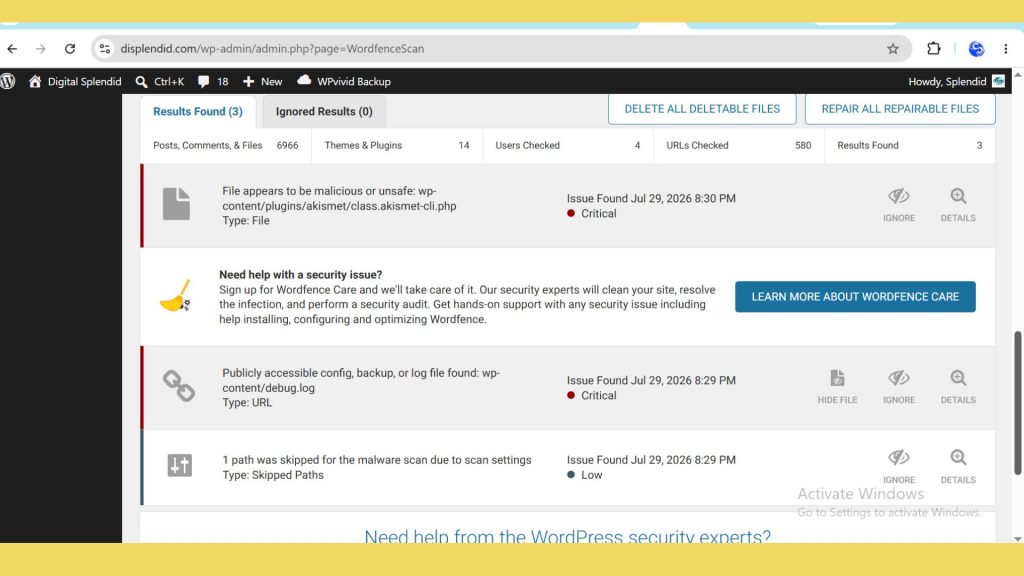
The scan reported one critical issue.
Interestingly, it wasn’t another hidden file.
Instead, Wordfence discovered that the Akismet plugin itself had been modified.
Inside one of Akismet’s files, malware had inserted code similar to:
include_once('../../../wp-includes/update-extensions.php');

This meant the attacker had modified a legitimate plugin so that every time Akismet executed, it attempted to load the hidden backdoor.
Deleting the compromised Akismet plugin completely was safer than trying to edit the modified file.
After removal, only routine security recommendations remained.
Wordfence’s ability to compare WordPress core, themes, and plugins against known clean versions is one of its strongest features, making it particularly useful after an incident like this. (Wordfence)
Why Would Anyone Hack a Small Website?
Many website owners ask the same question:
“Why would someone target my website?”
In most cases, they probably didn’t.
Today’s attacks are largely automated.
Bots continuously scan the internet searching for vulnerable WordPress websites.
Once access is obtained, compromised websites may be abused for purposes such as:
- Sending spam
- Hosting phishing pages
- Serving malware
- Creating hidden administrator accounts
- Installing persistent backdoors
- Scanning for additional websites on the same hosting account
Small websites become victims simply because they are accessible—not because they are personally valuable.
A Lesson About Standard Web Hosting
This experience also highlighted an important distinction between standard shared web hosting and managed WordPress hosting.
The website was hosted on an IONOS Web Hosting package rather than an IONOS Managed WordPress plan.
IONOS Web Hosting offers excellent value with features such as SSL certificates, SFTP access, one-click WordPress installation, and solid performance. However, responsibility for WordPress maintenance and security remains largely with the site owner. Managed WordPress plans, by contrast, include automatic WordPress core updates as part of the service. (IONOS)
That doesn’t make standard hosting insecure. It simply means website owners should add their own security layer.
For many WordPress websites, that additional layer includes:
- Wordfence Security
- Regular plugin updates
- Routine malware scans
- Frequent backups
- Strong administrator passwords
- Two-factor authentication
Why Wordfence Is Worth Installing
The free edition of Wordfence includes:
- Malware scanning
- File integrity monitoring
- WordPress firewall
- Login protection
- Two-factor authentication
- Detection of modified WordPress core, plugins, and themes
It also allows website owners to detect unexpected file changes long before visitors notice something is wrong. (Wordfence)
Recovery Checklist
Following the cleanup, these additional steps were completed:
- Deleted all identified backdoors
- Restored clean WordPress core files
- Removed the modified plugin
- Installed Wordfence
- Performed a full malware scan
- Changed administrative credentials
- Planned security scans for all other WordPress installations hosted on the same account
Final Thoughts
Perhaps the biggest lesson from this incident is that website security isn’t only about large businesses.
Even relatively small WordPress websites can become targets of automated attacks.
Fortunately, recovery doesn’t always require starting from scratch.
A combination of:
- clean WordPress core files,
- careful investigation,
- proper backups,
- SFTP access,
- and a trusted security plugin
can restore a compromised website while preserving its content and functionality.
For anyone running WordPress on a standard hosting plan, investing a small amount of time in proactive security is far easier than responding to a compromise later.
Recommended Resources
- IONOS Web Hosting (Affiliate): https://aklam.io/itqJTmJk
- Wordfence Free
- Wordfence Documentation
- IONOS Web Hosting

Leave a Reply